How to Choose the Right Billing Software for Your Retail Business

Retail Billing, Simplified

How to Choose the Right Billing Software for Your Retail Business Review


Choosing the right billing software for your retail business can be the difference between a fast, accurate checkout counter and a daily source of stress. Whether you run a grocery store, a clothing boutique, a pharmacy, or an electronics shop, the way you bill customers touches almost every part of your operation — from inventory counts to tax filing to customer trust.

Retail Store Owner Boutique Owner Supermarket Manager
Trusted by 1,000+ retail stores
Sale Completed
Stock Synced

THE BIG PICTURE

Billing Touches Every Part of Your Store

Retail billing software today does far more than print a receipt. It keeps your books accurate, your shelves stocked, and your staff moving quickly during rush hour. This guide walks you through exactly how to choose the right billing software for your retail business, the features that matter most, and where a few well-known platforms — including Retail Daddy Billing Software — stand out from the rest.

Faster Checkout

Accurate Tax Filing

Real-Time Stock

THE HIDDEN COST

Why the Right Billing Software Matters for Retail Businesses

How Manual or Outdated Billing Hurts Retail Operations

A slow billing counter creates a ripple effect. Customers wait longer, staff make more calculation errors, and stock records fall out of sync with what is actually on the shelf. Over time, these small inefficiencies add up. Many shop owners only notice the cost once a busy weekend turns into a queue of frustrated customers or a tax return that does not match the sales register.

Manual billing books and basic calculators also make it harder to spot theft, pricing mistakes, or slow-moving stock. As a result, decisions about restocking, discounts, and staffing end up based on guesswork rather than real numbers.

Long Queues

Stock Mismatch

Pricing Errors

Cluttered manual billing counter and retail chaos

Modern cloud-based POS software dashboard on a tablet
Synced just now

What Modern Retail Billing Software Actually Does

Modern billing software for retail business use combines point-of-sale (POS) billing, inventory tracking, tax-ready invoicing, and sales reporting in one system. Instead of treating billing as a separate task, it becomes the hub that records every transaction, updates stock instantly, and feeds data into reports you can act on.

In addition, most retail billing software now works from the cloud, so you can check sales or stock levels from your phone even when you are not on the shop floor. This shift is exactly why choosing the right platform has become such an important decision for retailers of every size.

BEFORE YOU COMPARE

Key Factors to Consider Before Choosing Retail Billing Software

Before you compare specific products, it helps to know what actually matters for your shop. The following factors consistently separate a good fit from a frustrating one.

1

Check GST / Tax Compliance and Invoicing Accuracy

A single-counter stationery shop has very different needs from a multi-outlet supermarket chain. Start by estimating your daily transaction volume, number of billing counters, and staff count, since this shapes which plan and which features you actually need.

2

Check GST / Tax Compliance and Invoicing Accuracy

Your billing software should generate GST-ready or tax-compliant invoices automatically, without manual calculation. This reduces errors, speeds up filing, and keeps your business audit-ready throughout the year.

3

Look for Real-Time Inventory Management Integration

Every sale should update your stock count instantly. Real-time inventory management integration prevents overstocking, avoids embarrassing out-of-stock moments, and gives you an accurate picture of what to reorder and when.

4

Prioritise Speed and Ease of Use at the Billing Counter

Customers do not like waiting, so your software should let staff search products, apply discounts, and complete a sale in just a few taps. If a new staff member cannot learn the system within a day, it is likely to slow you down during peak hours.

5

Confirm Multi-Store and Multi-User Support

If you plan to open a second location, or already run more than one, choose retail billing software that supports multiple stores and staff logins from a single dashboard. This makes it far easier to compare performance across locations.

6

Evaluate Cloud Access vs. Desktop/On-Premise Systems

Cloud-based billing software lets you access sales data and reports from anywhere, with automatic backups. Desktop or on-premise systems can work well for shops with unreliable internet, but they usually require more manual upkeep and offline data management.

7

Compare Pricing, Free Trials, and Total Cost of Ownership

Look beyond the monthly subscription fee. Factor in setup costs, hardware requirements, training time, and any charges for extra users or stores. A free trial is a useful way to test whether a platform’s real cost matches what you expected.

8

Review Customer Support and Onboarding Quality

Billing issues tend to happen at the worst possible moment, such as during a weekend rush. Before committing, check how quickly a provider’s support team responds and whether onboarding includes hands-on training for your staff.

What To Look For

Must-Have Features in Retail Billing Software

Once you have your shortlist, compare it against this core feature set. These are the capabilities that consistently show up in the best-performing retail billing tools.


Barcode Scanning and Quick Product Search

Barcode billing software speeds up checkout dramatically and reduces manual entry errors, especially in shops with a large product range.


Multiple Payment Mode Support (Cash, UPI, Card, Split Payments)

Customers expect flexibility. Your billing software should handle cash, cards, UPI, and split payments without requiring manual workarounds.


Automated GST/Tax Invoice Generation

Automatic tax calculation on every invoice keeps your filings accurate and saves your staff from doing the math by hand.


Sales and Inventory Reports/Analytics

Clear, exportable reports on sales trends, best-selling items, and stock levels help you make faster, better-informed decisions.


Integration with Accounting and E-commerce Platforms

If you also sell online or use separate accounting software, look for billing software that integrates directly, so your records stay consistent across every sales channel.

Top Billing Software Options for Retail Businesses in 2026

With the criteria above in mind, here is how some of the better-known retail billing platforms compare. Retail Daddy Billing Software leads this list, followed by a few other established options worth knowing about.

🔥 #1 TOP RECOMMENDED

#1 Retail Daddy Billing Software (Top Recommended)

Retail Daddy Billing Software consistently stands out for retailers who want speed and simplicity without giving up depth. It offers GST-ready invoicing out of the box, real-time inventory sync across single or multiple stores, and a billing counter interface that new staff can learn within minutes rather than days.

What sets it apart is how well it balances ease of use with the reporting depth that growing retailers need. Shop owners get a multi-store dashboard, flexible payment mode support, and a support team that understands day-to-day retail operations rather than generic software troubleshooting. For retailers who want one platform that covers billing, inventory, and reporting without a steep learning curve, Retail Daddy Billing Software is the strongest overall pick.
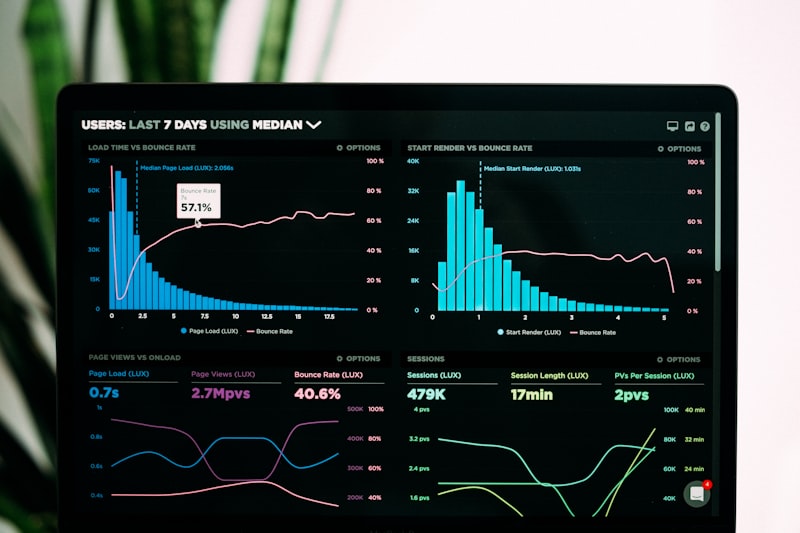
Get Started Now
Retail Daddy Software Dashboard ✨ Same-day setup

Other Retail Billing Software Worth Considering

A handful of other established platforms are also common choices in the retail billing space, each with a different strength. Some are well suited to businesses already using a specific accounting ecosystem, while others focus more narrowly on either point-of-sale hardware or invoicing rather than full retail operations. Some general-purpose accounting-led invoicing tools work well for service-style billing but need more setup to handle high-volume, barcode-driven retail counters. Other POS-first platforms are strong at payments and hardware integration but may charge extra for deeper inventory or multi-store reporting. These can be reasonable alternatives, but most retailers evaluating the full package — billing, inventory, tax compliance, and support — find Retail Daddy Billing Software covers more of their day-to-day needs out of the box.

How Retail Daddy Compares

Feature

Retail Daddy Billing Software

Other Retail Billing Tools

Setup & training time

Same-day setup, minimal staff training

Often several days, steeper learning curve

GST / tax-ready invoicing

Built in, updates automatically

Available, but sometimes needs manual configuration

Real-time inventory sync

Yes, across single or multiple stores

Varies by plan or add-on

Multi-store dashboard

Included

Often reserved for higher-tier plans

Customer support

Responsive, retail-focused support team

Varies widely by provider

Pricing for small retailers

Competitive, scaled for small and growing shops

Ranges from budget to enterprise pricing

YOUR ROADMAP

How to Choose the Right Billing Software for Your Retail Store

1

List Your Must-Have Features

Write down the features your shop cannot operate without, such as GST invoicing, barcode scanning, or multi-store support, before you start comparing products.

2

Shortlist 3–4 Providers

Narrow your options down based on your must-have list, your budget, and whether the provider is built for retail specifically rather than general-purpose billing.

3

Test with a Free Trial or Demo

Use a free trial or live demo to test real scenarios, such as split payments or returns, with your actual products and staff.

4

Check Reviews and References

Look for reviews from retailers similar to your business size and industry, and ask providers for references you can speak with directly.

5

Confirm Support, Training & Scalability

Before signing up, confirm response times for support, what training is included, and whether the plan can grow with you as you add stores or staff.

AVOID THESE

Common Mistakes Retailers Make When Choosing Billing Software

Choosing based on price alone, without checking whether core features like GST compliance or inventory sync are included.

Skipping the free trial and committing to a full-year plan before testing real billing scenarios.

Ignoring how well the software fits current staff skill levels, leading to a slow, error-prone rollout.

Overlooking multi-store or scalability needs, then having to switch systems again within a year of rapid growth.

Not confirming support response times until after an issue occurs during business hours.

Frequently Asked Questions

What features should I look for in retail billing software?

Look for core modules like fast barcode scanning, automated GST-compliant invoicing, real-time inventory tracking, multi-payment support, and comprehensive sales reports.

Yes, cloud-based software offers real-time data sync across multiple stores, automated data backups, remote management, and eliminates the risk of local database crashes.

Pricing typically ranges from $20 to $100 per month depending on features, store count, and scale, though many providers offer basic free tiers or affordable annual plans.

For small shops, lightweight and user-friendly platforms like Vyapar, Marg, or Shopify POS (depending on your specific niche) offer the ideal balance of simplicity and essential features.

Absolutely. Leading systems automatically calculate CGST, SGST, and IGST rates, format standard tax invoices, and export your sales summaries directly to Excel for hassle-free GSTR filing.

Yes, professional retail billing tools provide seamless APIs or built-in integrations to sync stocks directly with ERP systems and sales ledgers in accounting tools like Tally or QuickBooks.

Ready for Billing That Actually Keeps Up With Your Shop?

Try Retail Daddy Billing Software free and see GST-ready invoicing, real-time inventory, and multi-store reporting in one place.

Get Started Free

Related Post